
AI observation tools for SA preschool teachers - write less, observe more
Every term, South African preschool teachers complete ELDA and Grade R assessments for every child in their class. The rating part takes time. The writing part - observation comments, assessment summaries, parent-friendly reports - takes much longer. EarlyTrack's AI observation tools change what that process looks like.
- AI generates observation comments from skill ratings already entered - teachers review, not retype
- Voice-to-text captures observations hands-free during classroom activities - in English and Afrikaans
- AI skill tagging maps recorded observations to ELDA and Grade R skills automatically
End-of-term comment writing is the most time-consuming, most dreaded part of a preschool teacher's year - and it does not have to be
Ask any South African preschool teacher what the worst part of end-of-term reporting is and the answer is almost always the same: the observation comments.
Not the ratings - those can be completed in a structured session with the assessment form in front of them, working through one domain at a time. The ratings are systematic. They have a defined answer.
The comments are different. A comment requires the teacher to translate a rating into a sentence - or several sentences - that accurately describes a specific child's progress in a specific skill or domain, in language a parent can understand and act on, that does not sound identical to every other comment in the same category. For 20 students across six ELDA domains, that is potentially hundreds of individually written paragraphs. For a Grade R teacher assessing 98 skills across three subjects for 25 students, the scale is similar.
Most teachers write these comments at home. After school hours. In the weeks before the end of term. On a laptop while the rest of the household is asleep. From memory - because the observations they made during the term were never recorded systematically, only experienced in the classroom and hoped to be recalled when needed.
The underlying problem is not that teachers are slow writers. The problem is structural. Observations are made during the school day, when writing them down is impractical. Comments are written at the end of term, when the specific memories of what each child did in March are fading. The two events - observation and documentation - are separated by weeks and the gap between them is filled by exhaustion and guesswork.
EarlyTrack closes that gap. Observations are captured during the school day, when they happen. AI generates the comments at the end of term, from the evidence that was already recorded. The teacher's professional judgement drives both - EarlyTrack removes the manual writing load in between.
From classroom moment to parent report - the full EarlyTrack observation workflow
EarlyTrack does not treat observation comments as a standalone feature. They are the output of a connected pipeline that begins the first week of term and ends when the parent portal delivers the report.
Eight AI-powered capabilities - from voice capture to parent report
All AI and observation features are available on the Professional plan. The 14-day free trial gives you complete Professional access.
Capture observations during the school day - hands-free, in English or Afrikaans
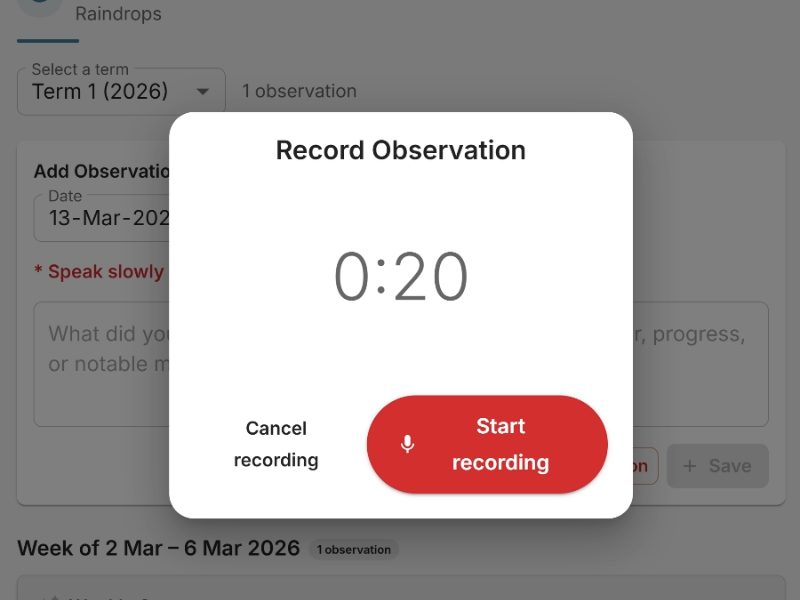
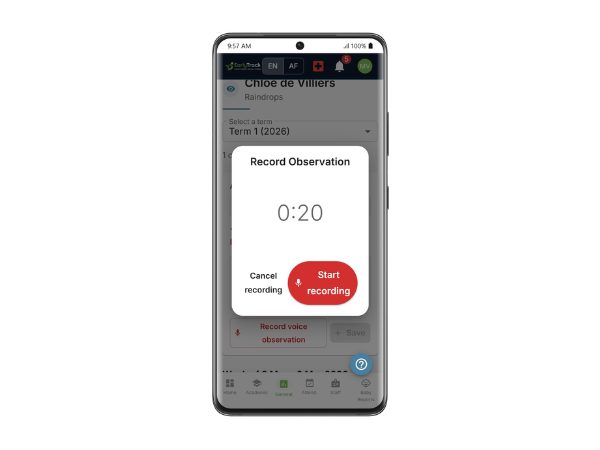
The most accurate observation is the one recorded at the moment it happens - not reconstructed from memory three weeks later. EarlyTrack's voice observation tool lets teachers record observations on their phone during classroom activities, outdoor play, or one-on-one moments - without interrupting what they are doing.
The teacher opens the EarlyTrack app on their phone, selects the student, and records a short voice note. The recording is transcribed automatically using a dedicated speech-to-text service with specific support for Afrikaans. The transcription is reviewed by the teacher, edited if needed, and saved to the student's daily observation log.
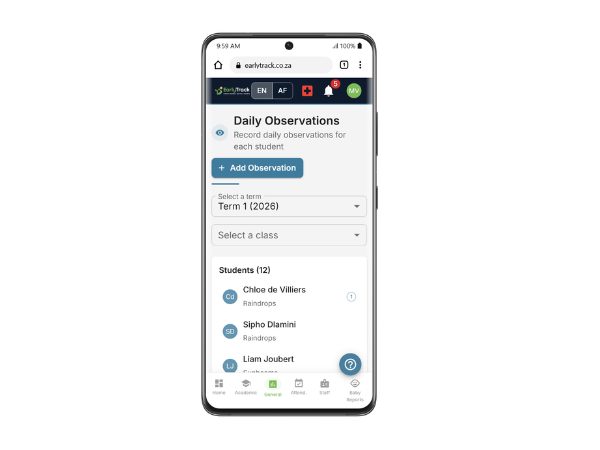
A structured daily observation record - for every student, every day
Not every observation is captured by voice. Teachers also record written observations directly in the EarlyTrack observation log - structured notes attached to a specific student, a specific date, and optionally a specific domain or subject area.
Written observations are timestamped and stored chronologically in the student's observation history. They are visible to the teacher and the principal, but not to parents - the observation log is an internal record, not a parent-facing document.
Observations mapped to ELDA and Grade R skills - automatically
A voice or written observation is a piece of evidence. For it to support the formal assessment, it needs to be connected to the skills the teacher is assessing. EarlyTrack's AI skill tagging processes each observation and maps it to the relevant ELDA or Grade R skills automatically.
For each suggested skill match, the AI provides a confidence score and a suggested rating level. The teacher reviews the suggestions, accepts or adjusts them, and the confirmed tags are stored against the observation.
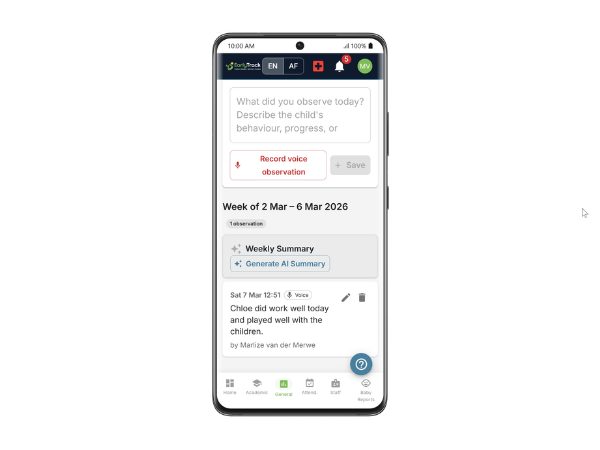
A weekly digest of each student's development - generated automatically every Friday
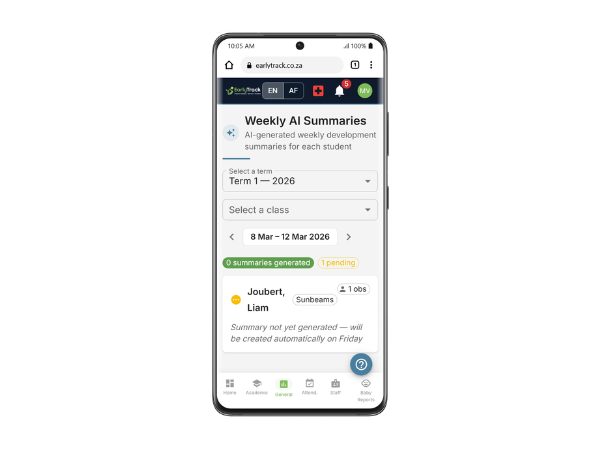
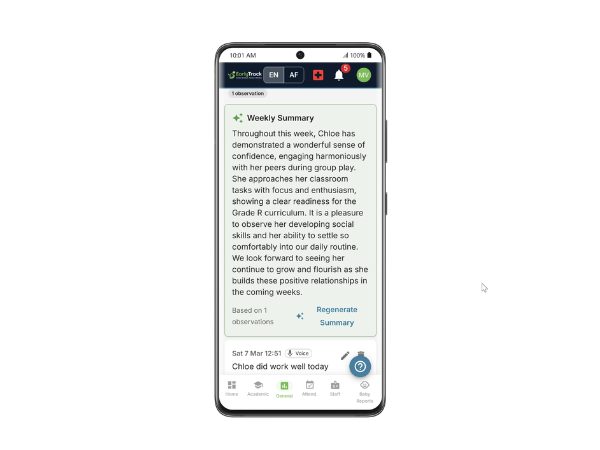
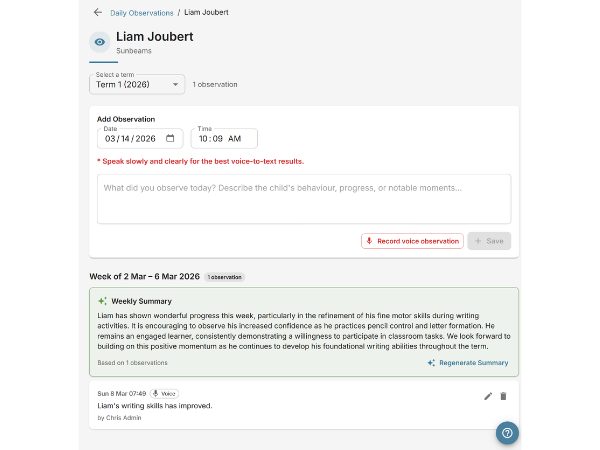
Keeping track of what each child did across a full school week - across 20 or more students - is not possible from memory. EarlyTrack's weekly AI observation summary collates all voice and written observations recorded for each student during the previous week and generates a brief developmental summary per student.
The weekly summary is generated automatically and delivered to the teacher's EarlyTrack dashboard every Friday. It covers the total number of observations, the domains where observations were concentrated, notable skill demonstrations, any concern-flagged observations, and skills where no observations were recorded - identifying gaps in the evidence base.
By the end of Term 1, the teacher has four weekly summaries per student. By the end of Term 4, sixteen per student - a developmental record covering the full academic year.
From skill ratings to professionally written comments - in seconds, in English or Afrikaans
This is the capability that changes end-of-term reporting for South African preschool teachers. Once a teacher has rated the skills for a student's ELDA or Grade R assessment, EarlyTrack can generate observation comments for any or all of those skills using AI.
The AI generates comments based on three inputs: the skill being commented on, the rating the teacher assigned, and the observations tagged to that skill during the term. A comment generated with observation evidence behind it is substantially more specific and accurate than one generated from a rating alone.
Comment generation options:
All generated comments are editable. The teacher reads the comment, adjusts any phrasing, and confirms. The AI provides a professionally constructed first draft. The teacher applies their professional judgement.
Comments are generated in the teacher's selected language - English or Afrikaans. The language can be set per student, so a class with both English and Afrikaans families receives comments in the appropriate language for each child.
A term overview for each student - one summary that brings the whole assessment together
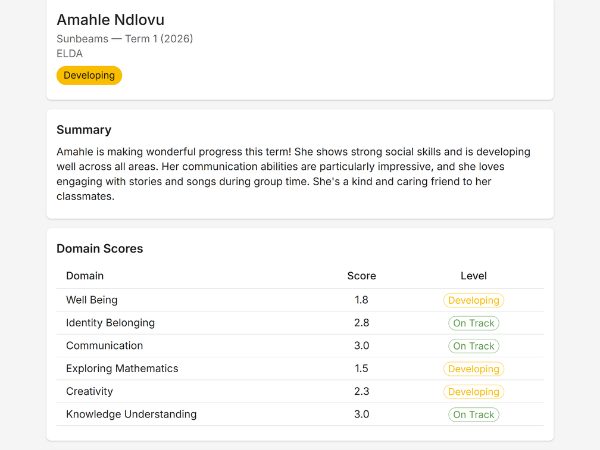
An ELDA assessment covers 964 skills across six developmental domains. A Grade R assessment covers 98 skills across three subjects. No parent reads every rating. What most parents want - and what most teachers struggle to write at scale - is a coherent paragraph or two that describes where the child is this term.
EarlyTrack's AI assessment summary generates that overview automatically once all skills are rated. The summary identifies the domains or subjects where the child performed strongest and where additional support would be beneficial.
Assessment summaries are generated in English or Afrikaans. They are visible to the teacher and principal in the assessment view. They do not appear in the parent-facing PDF report - that is covered by the parent-friendly summary.
The same assessment - in language a parent can understand and act on
An ELDA or Grade R assessment is a professional document. The skill ratings and domain structure make sense to an educator. They do not always make sense to a parent who has not studied early childhood development.
EarlyTrack's AI parent-friendly summary translates the formal assessment into a short, plain-language paragraph written for the parent - not the principal. It describes the child's development in terms a parent can understand, highlights what the child does well, acknowledges where they are still growing, and frames the report in an encouraging, constructive tone.
Parent-friendly summaries appear in the PDF report delivered to the parent portal - directly below the school's header and before the formal skill ratings.
Parent-friendly summaries are generated in the parent's preferred language - English or Afrikaans.
Practical activities for parents - tailored to each child's assessment results
The parent-friendly summary tells a parent where their child is. The home learning activity suggestions tell them what they can do about it.
EarlyTrack generates a set of age-appropriate home learning activities for each student based on their specific assessment results - focusing on the developmental areas where the child is still progressing. Activities are practical, low-resource suggestions that a parent without an early childhood background can implement at home.
Activities are generated in English or Afrikaans based on the student's language setting. Afrikaans activities use language and examples that are culturally grounded - not translated from English equivalents.
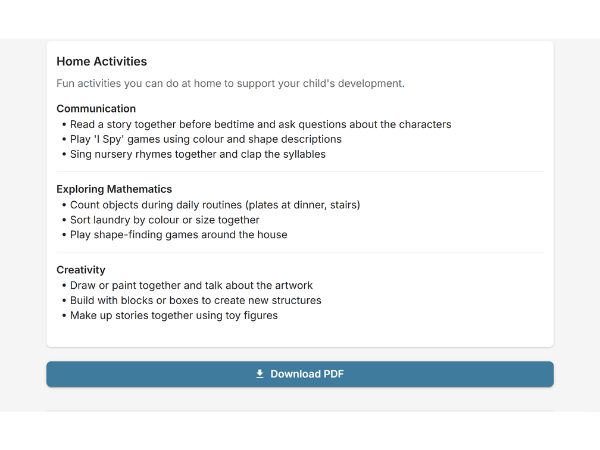
What the observation workflow looks like from day one to report delivery
Understanding the full term arc - from first observation to parent report - shows why the pipeline produces better results when used consistently from week one.
Week 1 - Term opens, observations begin
Teachers start recording observations from the first week of term. Voice observations are captured during classroom activities on the phone. Written observations are added for specific milestones, concerns, or parent conversations. The observation log begins building.
Weeks 1 to 10 - Observations accumulate, AI skill tagging runs
As observations are recorded, the AI processes each one and suggests skill tags. Teachers review and confirm tags during or after school - a task that takes minutes per observation, not hours. By mid-term, most students have a meaningful developmental evidence base linked to specific ELDA or Grade R skills.
Every Friday - Weekly summaries generated
At the end of each week, the AI generates an observation summary per student - covering what was observed, which domains were active, and which skills have no observations yet. Teachers receive summaries in their dashboard automatically.
Final 2 weeks - Assessment forms completed
Teachers open the assessment form for each student. For each skill, tagged observations are visible alongside the rating field. The teacher rates each skill - informed by the observation evidence - and submits for principal review.
End of term - AI generates all written content
With all skills rated, teachers generate AI observation comments - individually, by domain, or for the full assessment in bulk. The AI draws on the skill ratings and any tagged observations. Assessment summaries, parent-friendly summaries, and home learning activities are generated.
Principal approval - Content reviewed before delivery
The principal reviews the completed assessment, reads the AI-generated summaries and comments, requests changes where needed, and approves.
Report delivery - PDF and parent portal
On approval, the branded PDF report - including parent-friendly summary and home activities - is delivered to the parent portal automatically. The parent receives an email notification.
Parent receives the report
The parent opens the parent portal, reads the parent-friendly summary, downloads the PDF, and sees the home learning activities for the term. The full professional assessment is in their hands without the teacher having written a single sentence from a blank page.
What the AI does - and what it does not do
EarlyTrack's AI tools assist the teacher's professional process. They do not replace the teacher's judgement, and they are not designed to.
✓ What the AI does
- ✓ Transcribes voice observations into text, accurately, in English and Afrikaans
- ✓ Suggests which ELDA or Grade R skills are relevant to a recorded observation - the teacher confirms
- ✓ Generates a professionally written first draft of observation comments based on skill ratings and tagged observations
- ✓ Produces a coherent term overview summary from the full set of skill ratings
- ✓ Writes a plain-language parent summary from the same assessment data
- ✓ Suggests practical home learning activities based on the child's specific rating profile
✕ What the AI does not do
- ✕ Rate skills - the teacher enters every rating
- ✕ Approve or submit assessments - only the teacher submits and only the principal approves
- ✕ Access information about any other student - each AI generation is isolated
- ✕ Produce identical comments for different children with the same rating
- ✕ Override the teacher - every AI output is editable
Generated comments should always be reviewed before submission. The AI works from structured data - ratings and observation tags - and produces language that is generally accurate to those inputs. However, the teacher knows the child. The review step exists for exactly that reason.
Who the observation and AI tools are designed for
Teachers who spend evenings and weekends writing observation comments
If your end-of-term reporting cycle regularly takes two to three weeks of after-hours work, the AI comment and summary tools change that. Evidence is captured during the school day and writing is done by AI at the end of term.
Teachers who observe constantly but document inconsistently
If you make excellent observations during the school day but struggle to record them, the voice observation tool is the entry point. A 20-second voice note is faster and more accurate than memory.
Afrikaans-medium schools
Every component of the observation pipeline - voice transcription, skill tagging, weekly summaries, observation comments, assessment summaries, parent-friendly reports, and home activities - is available in Afrikaans. Bilingual assessment reporting built in.
Schools upgrading from Standard to Professional
Standard plan users who have completed one or more terms without AI tools have a clear baseline for comparison. The 14-day free trial gives those schools full Professional access to evaluate the difference.
Principals evaluating the Professional plan upgrade
The AI observation pipeline is the primary source of additional value in Professional for schools already using EarlyTrack. This page answers: "what does Professional give us for the assessment workflow?" View pricing.
What teachers and principals should know before using AI-generated content
Every AI output is reviewed by the teacher
No AI-generated content is submitted without the teacher reviewing and confirming it. Comments are in an editable text field, not a locked output.
The principal still approves before any report reaches a parent
The principal approval workflow applies to every assessment - AI-assisted or not. Nothing reaches a parent without principal sign-off.
Observation data is isolated to your school
Voice recordings, transcriptions, skill tags, and observation logs are stored within your school's isolated data environment. No data is used to train AI models.
Voice recordings are processed and deleted
The audio file is processed by the speech-to-text service and converted to text. The audio is not stored permanently. The transcription is the permanent record.
AI-generated content is not presented as the teacher's independent work
The assessment record shows that AI tools were used. Transparency about AI assistance is part of how EarlyTrack approaches these tools.
Your data is protected by industry-standard security
All data is encrypted in transit and at rest. Access is controlled through role-based permissions. Read our privacy policy for full details.
Questions about using AI in preschool observation and reporting
All AI and observation features require Professional
Complete your next end-of-term assessment cycle without writing from a blank page
The 14-day free trial gives you the complete Professional plan - voice observations, AI skill tagging, weekly summaries, unlimited AI comment generation, assessment summaries, parent-friendly reports, and home activity suggestions - with no credit card required.
Start your free 14-day trialNo credit card. Full Professional access. Cancel any time.