
Digital ELDA assessments for South African preschools - no spreadsheets, no manual reports
EarlyTrack replaces the entire ELDA assessment cycle with a structured digital platform - 964 skills, five age brackets, six developmental domains - ready to use from the first day of term.
- 964 ELDA skills across 5 age brackets - already in the system, nothing to set up
- AI generates observation comments in English and Afrikaans - teachers review, not retype
- Approved assessments trigger branded PDF reports delivered automatically to parents
The ELDA assessment cycle is broken - and every teacher knows it
At the start of every term, a teacher opens last term's spreadsheet - or downloads a new one - and rebuilds the assessment grid for their class. Student names go in the rows. Skills go in the columns. The rating scale is applied manually, domain by domain, child by child.
At the end of term, the ratings exist - somewhere inside a spreadsheet that was never designed to become a parent report. So the teacher opens a Word document, rebuilds a report template, copies the ratings across, and begins writing observation comments. Twenty students. Dozens of skills. Hundreds of comments. All typed from scratch.
The principal reviews each report - or tries to, across a stack of documents that arrived in a shared folder, or were emailed individually, or printed and left on a desk. Parents receive the report by WhatsApp, or in a paper envelope, or sometimes not at all.
This is not how a professional assessment framework should work.
The ELDA framework - all 964 skills - already in EarlyTrack
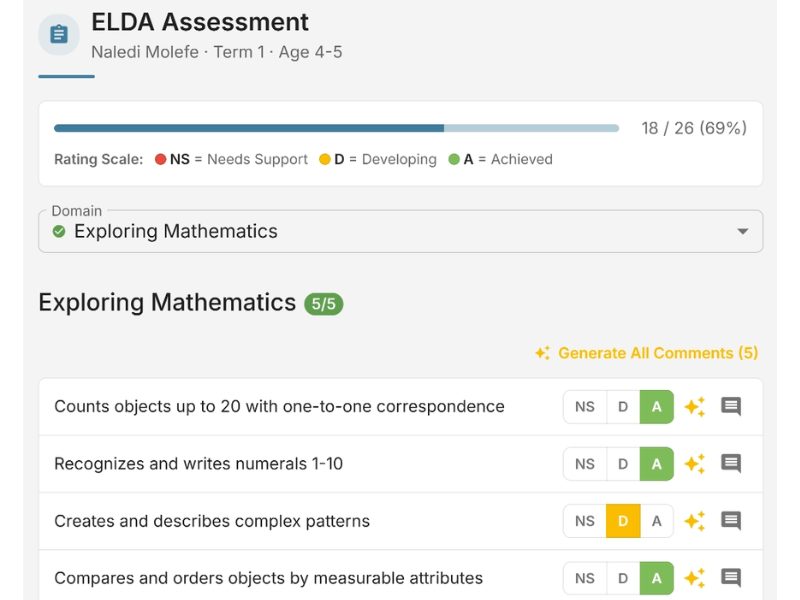
Teachers open a class, select a student, select the term, and begin rating. The form guides them through each domain. Skills are rated on the correct three-level scale. Progress is tracked and auto-saved every 30 seconds.
Rate Skills
Teachers rate skills domain by domain. Auto-save every 30 seconds. Complete across multiple sessions.
Principal Approves
Submit for review. The principal approves, requests changes with a note, or rejects.
Report Delivered
Branded PDF generated automatically and sent to the parent portal with email notification.
What the ELDA assessment module covers
The full ELDA skill set is seeded into EarlyTrack
All 964 skills are organised across five age brackets (0 to 1, 1 to 2, 2 to 3, 3 to 4, and 4 to 5 years) and six developmental domains. Teachers work within the correct age bracket for each student. There is nothing to import, configure, or build.
AI-generated observation comments - in English and Afrikaans
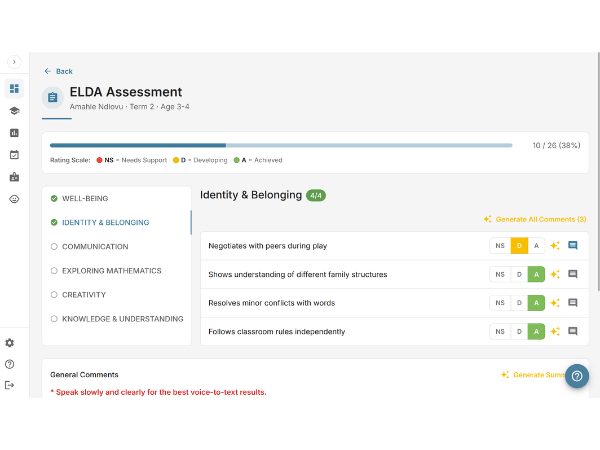
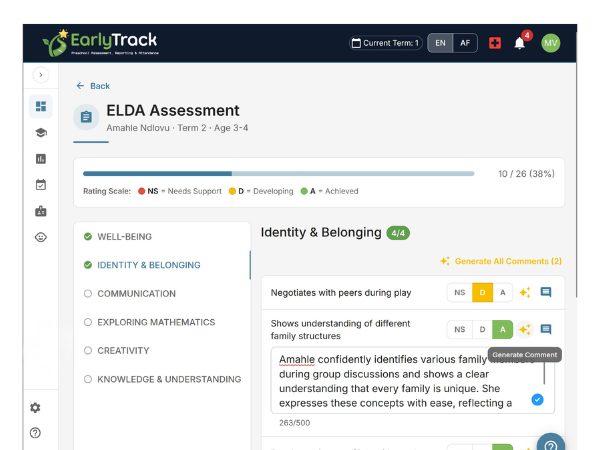
EarlyTrack generates observation comments using AI, based on the skill ratings the teacher has entered. Comments are produced in the teacher's chosen language and are always editable. The AI gives teachers a well-constructed first draft grounded in the child's actual assessment data.
Voice observations - captured during the school day
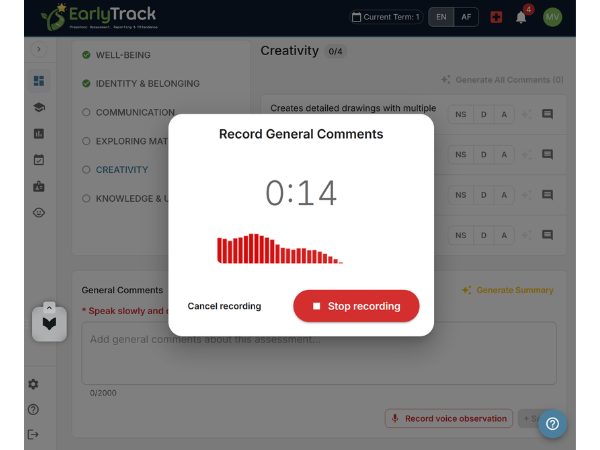
Teachers record a short observation using their phone or tablet. The recording is transcribed automatically with specific support for Afrikaans. On the Professional plan, observations are mapped to relevant ELDA skills automatically with confidence scores.
Quality control before reports reach parents
EarlyTrack enforces a submission and approval process before any report is generated. The principal reviews skill ratings and observation comments, then approves, requests changes with a written note, or rejects. The full approval trail is recorded.
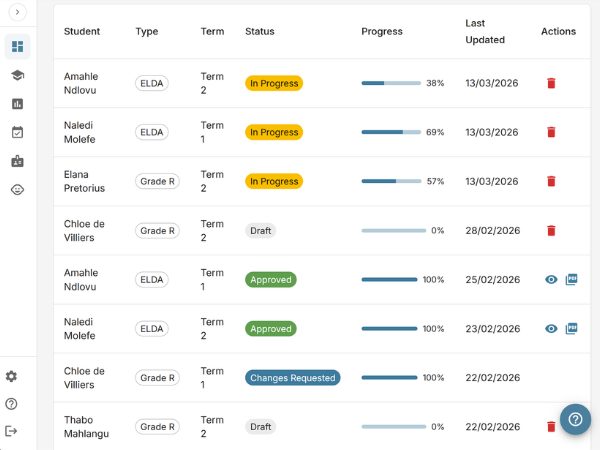
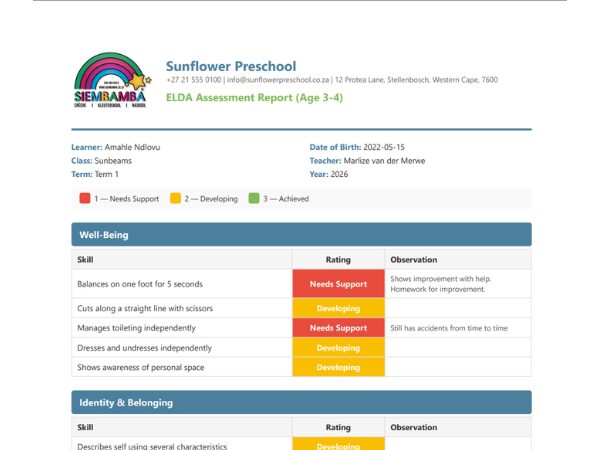
Generated automatically, delivered to parents
Once approved, EarlyTrack generates a branded PDF report with the school's logo, student details, skill ratings by domain, and observation comments. On the Professional plan, reports include AI summaries and home learning activities. The PDF is delivered to the parent portal and by email.
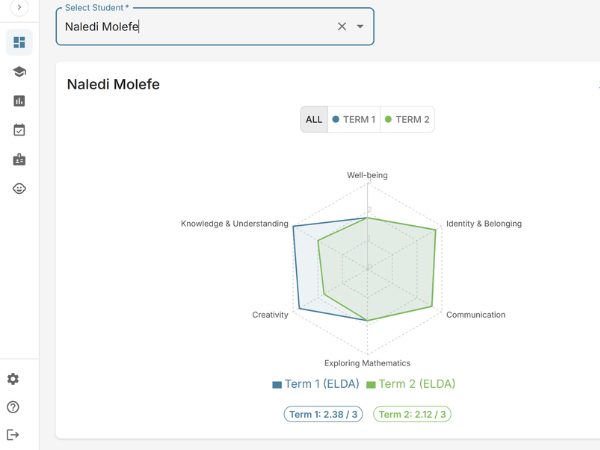
Progress over time, not just per term
EarlyTrack stores every assessment result and surfaces trend data across terms at the student, class, and school level. Individual skill mastery, domain performance, and class-wide comparisons help teachers and principals identify where support is needed.
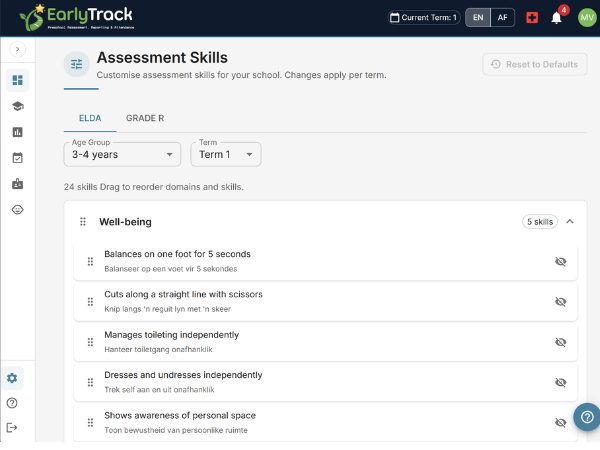
For schools with specific curriculum additions
On the Professional plan, schools can add custom skills to their assessment forms, override standard skill descriptions, and reorder domains to match their curriculum sequence. Custom skills sit alongside the standard ELDA framework and are included in generated reports.
From the first day of term to the parent's inbox
Who the ELDA assessment module is designed for
Preschools managing ELDA across multiple classes
A single overview of every assessment's status - how many are in progress, how many are pending approval, and which are overdue - without asking each teacher individually.
Teachers who spend evenings writing observation comments
The AI comment tool changes that. Generate a full set of observation comments in minutes and spend the remaining time reviewing them rather than writing them.
Afrikaans-medium preschools
Assessment forms, skill titles, AI-generated comments, PDF reports, and voice transcription are all available in Afrikaans. Nothing to translate.
Schools preparing for year-end reporting
PDF reports are professionally formatted and branded. At year-end, the rollover process archives all assessments and prepares the system for the new academic year.
Schools that also run Grade R
EarlyTrack supports both ELDA and Grade R assessments on the same platform. 98 Grade R skills across Home Language, Mathematics, and Life Skills.
What principals should know before switching from spreadsheets
Your existing student data can be imported
EarlyTrack accepts bulk imports from CSV files using AI-powered column mapping. The onboarding wizard walks you through the import process in a guided eight-step setup.
The system auto-saves every 30 seconds
Teachers do not lose work if they are interrupted mid-assessment. A teacher can close the assessment and return to it later without losing any ratings or comments.
Assessments cannot be sent to parents without principal approval
The approval workflow is enforced - not optional. No assessment generates a PDF report or reaches the parent portal until the principal has explicitly approved it.
All data is isolated to your school
EarlyTrack is a multi-tenant platform. Your school's assessment data is completely isolated from every other school on the platform. No other organisation can access your records.
You can export everything
Assessment data, reports, and student records can be exported at any time. Your data belongs to your school.
Questions about switching to digital ELDA assessments
ELDA assessments on Standard and Professional
Explore related features
Read more: How to write ELDA observation comments
Replace your ELDA spreadsheet before the next term starts
The 14-day free trial gives you the complete Professional plan - every assessment feature, every AI tool, every report type - with no credit card required. Set up your school, import your students, and complete a trial assessment in the same session.
Start your free 14-day trialNo credit card. Full Professional access. Cancel any time.