
Digital enrolment & re-registration for your preschool
Replace paper enrolment packs with a guided online form parents complete on any device. You review, approve, and keep a branded PDF record, then roll everyone over at year-end with one-click re-registration. Included in the Professional plan at no extra cost.
- Parents complete a guided, auto-saving form, pre-filled from what you already know
- Review, approve, and track missing documents from one dashboard
- POPIA-aligned consent, digital signatures, and a branded PDF record
Paper enrolment means printing, chasing, re-typing, and missing documents you only notice too late
Enrolment is the busiest, most paperwork-heavy moment of a preschool's year, and in most South African ECD centres it still runs on paper. Packs are printed, handed out at the gate or sent home in school bags, and then begins the long chase: which families have returned the form, who still owes a birth certificate, whose proof of residence is a photocopy of a photocopy.
When the forms do come back, someone, usually the principal or the office, re-types every field into a spreadsheet or a register by hand. Handwriting is misread, fields are skipped, and the same parent details are captured again every single year. The information already existed; it just lived on paper that nobody could query.
Then there are the documents and the consents. A birth certificate is missing but nobody notices until the child has already started. The indemnity was signed but filed loose in a folder. Photo consent was assumed rather than recorded, which is exactly the kind of thing POPIA expects you to be able to prove. And at year-end the whole exercise repeats: paper re-registration forms, the same chasing, no clear early picture of who is actually coming back.
One enrolment flow, parents complete it online, you approve, and the record keeps itself
EarlyTrack's Digital Enrolment module replaces the print-and-chase routine with a connected flow: parents complete a guided form from any device, you review and approve while tracking missing documents, a branded PDF record is generated, and at year-end everyone rolls over with one-click re-registration. Included in the Professional plan at no extra cost.
Parent completes online
Parents work through a guided, auto-saving form on any device, upload documents, accept the agreements, and sign digitally.
Admin reviews & approves
You review each application, see exactly what is still missing, then approve it or send it back to the parent to complete.
Branded PDF & roll-over
A branded PDF enrolment record is generated, and at year-end every family re-registers for the next year in one step.
What the Digital Enrolment module covers
All features on this page are included in the Professional plan at no extra cost. Standard does not include digital enrolment.
A guided online form parents complete on any device
Parents work through a clear, step-by-step enrolment form from their phone, tablet, or computer. It auto-saves as they go, and for existing families it is pre-filled from the learner and parent details you already hold, so they confirm rather than retype.
Configure the year, the window, the documents, and the sections
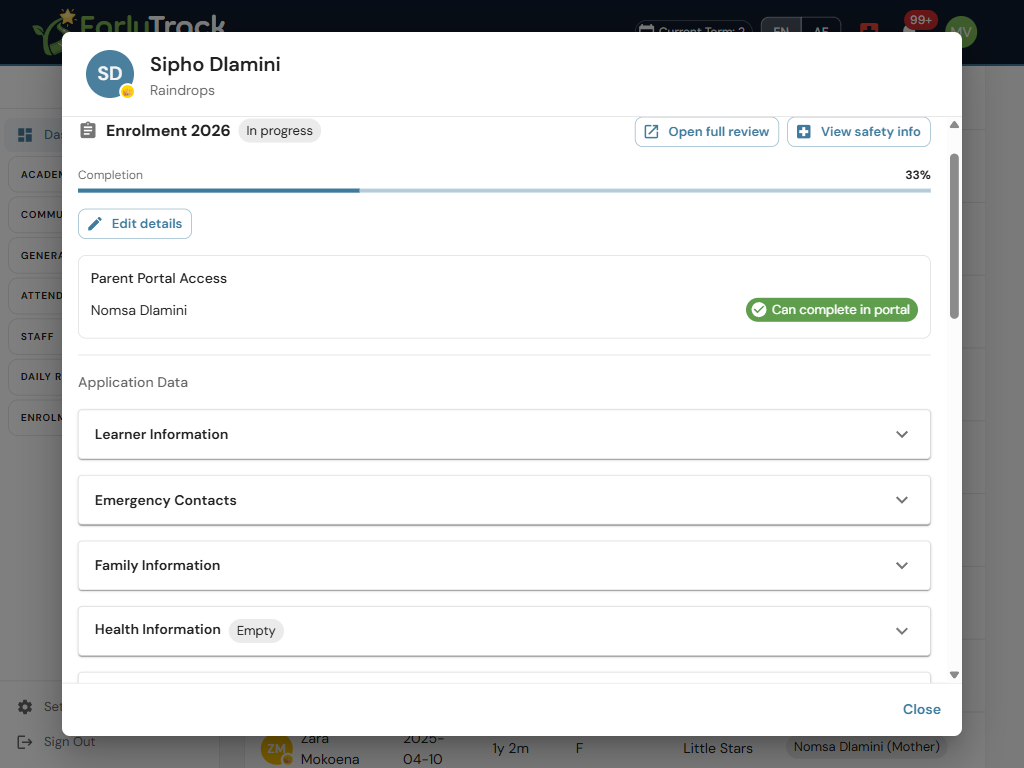
Set the enrolment year, the application window, the agreements parents must accept, the required documents, and which sections of the form appear, so the enrolment pack matches exactly how your school enrols, without printing a thing.
Fee, indemnity, and a POPIA privacy notice, accepted and recorded
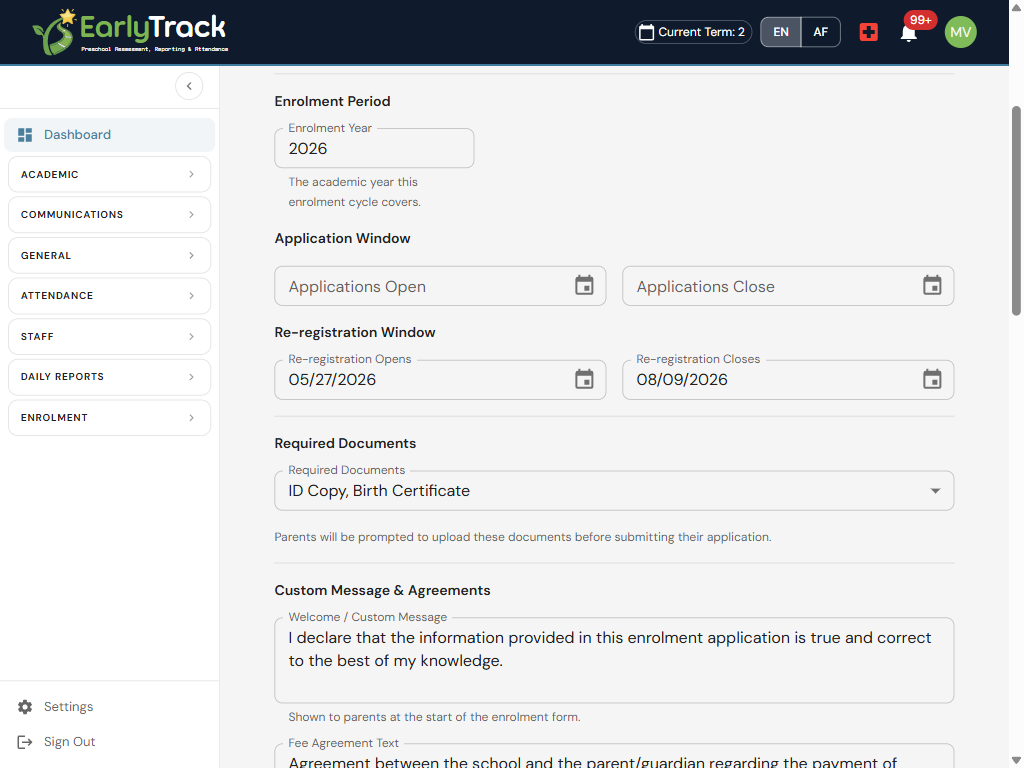
Parents are shown your fee or payment agreement, indemnity, and a POPIA privacy notice, and must give explicit, recorded acceptance to continue. Photo consent is an optional tick, a parent can decline it and still enrol, and you see exactly who agreed to what.
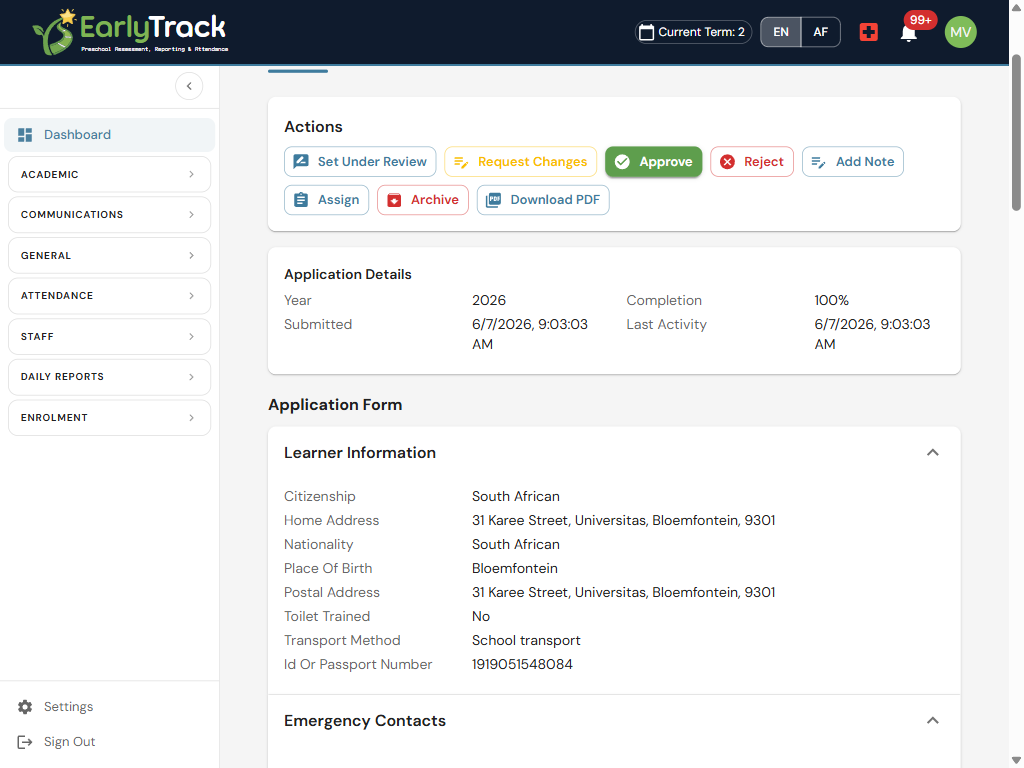
Approve, or send it back to the parent to complete
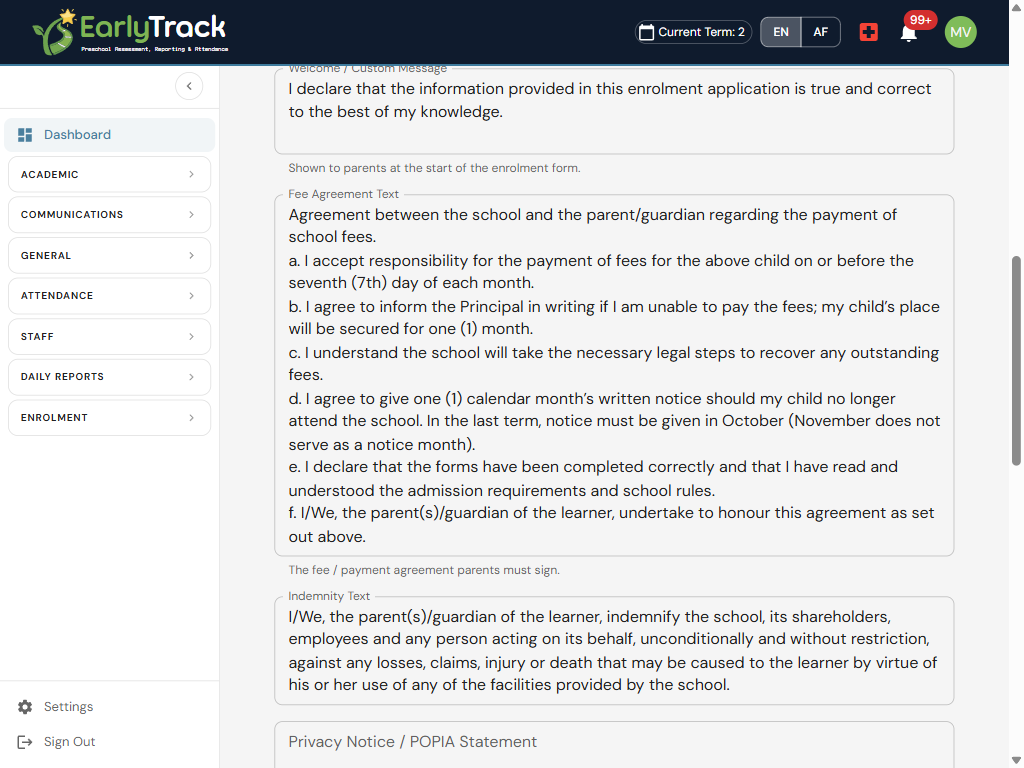
Open each application, see the captured details and uploaded documents in one place, then approve it or request changes. Requesting changes sends it straight back to the parent to fix, so nothing incomplete slips through into your records.
Every application, its status, and its class, on one screen
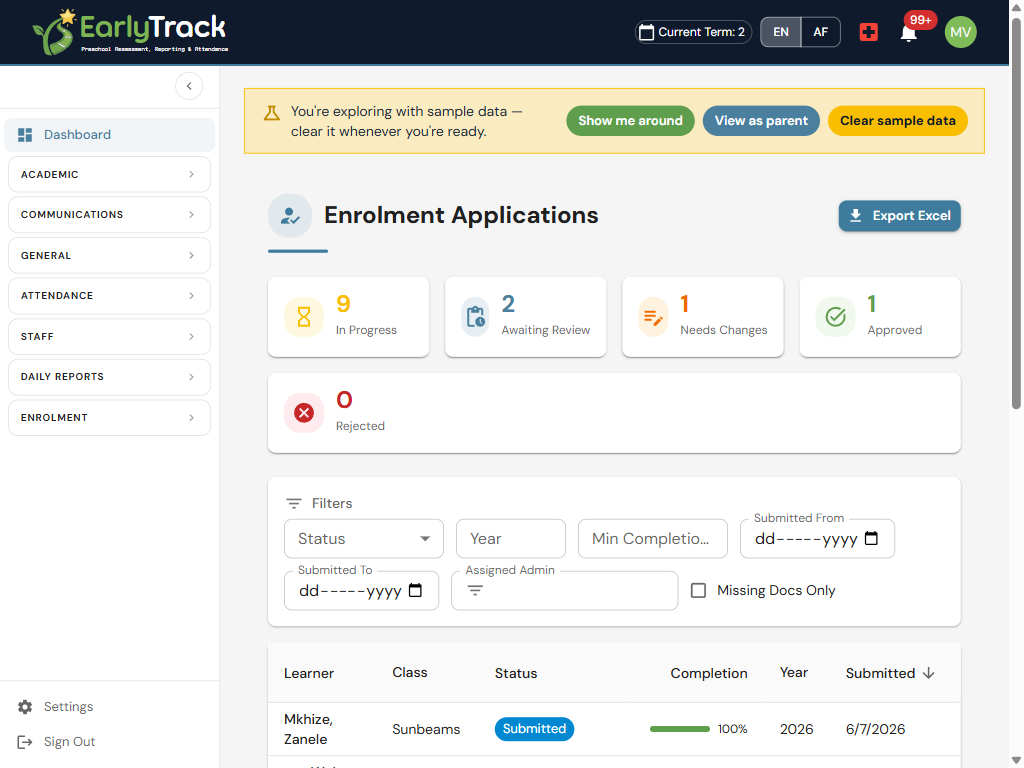
See all enrolment applications in one dashboard, with statuses, a class column, and filters, so you always know who is started, who is submitted, and who is approved. Export the whole list to Excel for your records or a quick headcount.
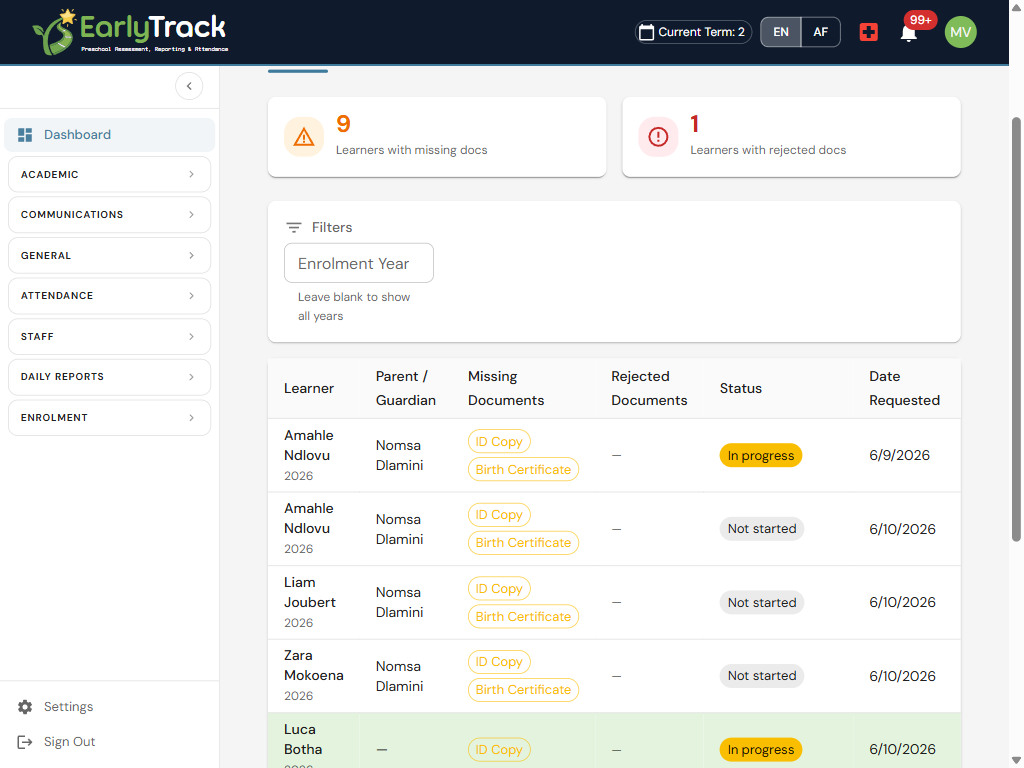
See exactly which learners are missing which documents
A missing-documents dashboard shows, at a glance, who still owes a birth certificate, an ID copy, or proof of residence. Chase precisely what is outstanding instead of re-checking every file, and automatic reminders nudge parents to upload it.
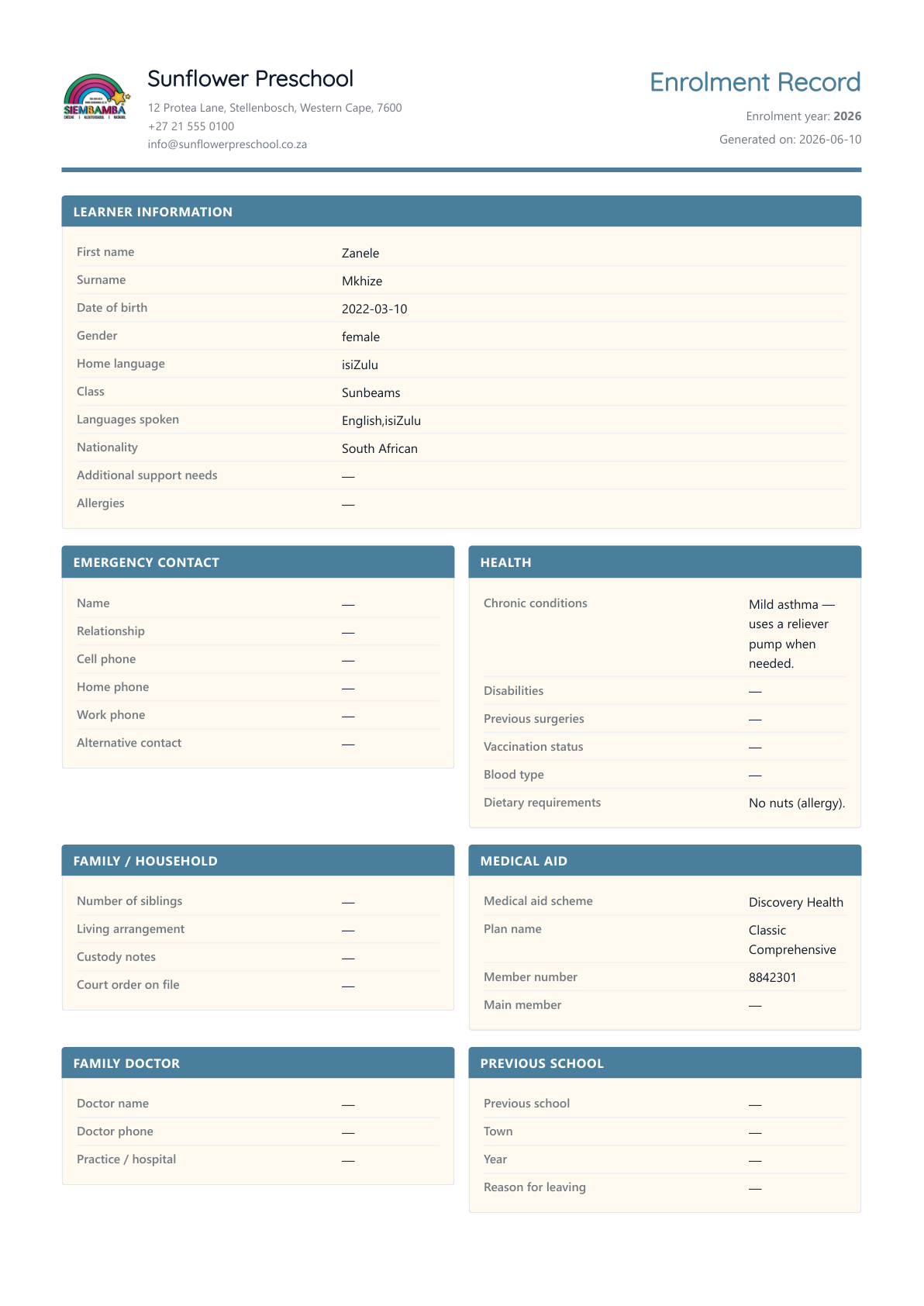
A branded PDF enrolment record, with agreements and signatures
Once an application is approved, EarlyTrack generates a branded PDF enrolment record for the learner, capturing the details, the agreements accepted, and the typed or drawn digital signatures, ready to file or print. The paper version, without the paper.
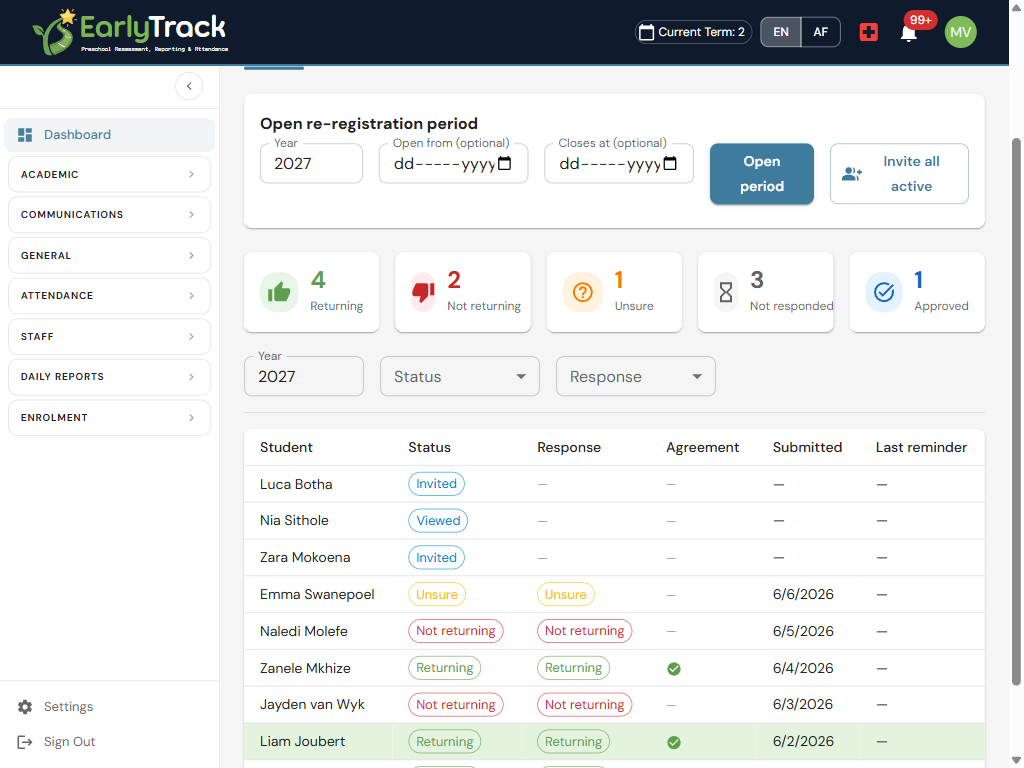
Roll everyone over for next year in one step
At year-end, ask each existing family whether their child is returning, not returning, or unsure for the next year. Details are pre-filled for a quick confirmation, reminders chase the families who have not answered, and you get an early, clear picture of next year's enrolment.
Teachers see safety details only, never finance or ID numbers
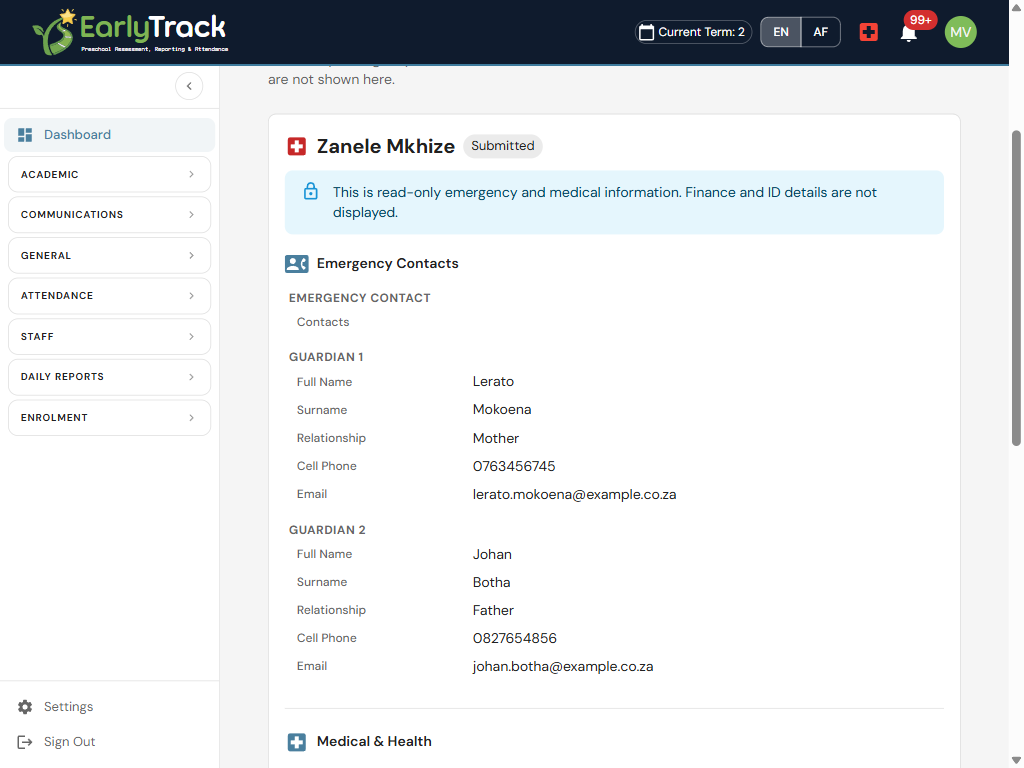
Enrolment captures a lot, but teachers only need the safety essentials. The read-only Learner Safety Info shows emergency contacts, allergies, and medical notes for each child, and deliberately hides fees, banking, and ID numbers, so sensitive data stays where it belongs.
From invite to approved record, and on to next year
Who the Digital Enrolment module is designed for
Preschools & ECD centres
If enrolment season means printing packs, chasing parents at the gate, and re-typing forms into a register, EarlyTrack moves the whole thing online and keeps a clean, branded record for each child.
Grade R
Grade R intake brings its own paperwork and required documents. Configure the year, the documents, and the agreements once, and let parents enrol and re-register online.
Daycares
Daycares enrol throughout the year, not just in January. An always-open application window and pre-filled forms make mid-year intakes as simple as the main one.
Aftercare
Aftercare registrations need the same consents, indemnities, and emergency details as the main programme. Capture them digitally, with signatures, and keep the safety info to hand for staff.
Multi-class schools
With several classes to fill, the applications dashboard, class column, and filters show exactly who is enrolled where, and re-registration gives an early read on next year's class sizes.
What principals should know before moving enrolment online
POPIA-aligned consent and a privacy notice
Parents are shown a privacy notice and give explicit, recorded consent as part of enrolling. You can show what was agreed, by whom, and when, which is exactly what POPIA expects of how you collect a child's personal information.
Safety Info shows emergency and medical only, never finance or ID numbers
The teacher-facing Learner Safety Info is deliberately limited to emergency contacts, allergies, and medical notes. Fees, banking, and ID numbers are never shown there, so sensitive data is not spread further than it needs to be.
Documents are stored securely
Birth certificates, ID copies, proof of residence, and other uploads are held within your school's isolated data environment. No other school can see your families' documents.
A full audit trail of every step
Submission, acceptance of each agreement, the signature, approval, and any requested changes are all recorded. If a parent ever asks what they signed, you can show it.
Bilingual for parents and staff, in English and Afrikaans
The enrolment and re-registration experience is available in English and Afrikaans throughout, so parents complete the form in the language they are comfortable with and staff work in theirs.
Questions about moving enrolment off paper
Explore related features
Enrol your families from the same platform as your assessments
The 14-day free trial gives you the complete Professional plan, the full Digital Enrolment module, including the guided parent form, document tracking, POPIA-aligned consent, digital signatures, branded PDF records, and yearly re-registration, with no credit card required.
Start your free 14-day trialNo credit card. Full Professional access. Cancel any time.
Not ready? Request a walkthrough →
Digital Enrolment pairs naturally with the parent portal parents already use, and parent communication for the messages and reminders around it. EarlyTrack also covers student attendance tracking, staff management, and ELDA and Grade R assessments.