
Digital daily reports for every child - structured Baby cards, lighter Little Learners notes, specialised Neurodiverse tracking, and one shared Class Report per class
Replace handwritten daily report cards with four formats on one platform. Full structured cards for infant and toddler classes (feeding, sleep, nappy, photos). A lightweight comment-and-photo note for older preschool and Grade R. A specialised format for neurodiverse children covering nappies, food, emotion regulation, therapy visits and observation context. And one shared class report per class, written once for the whole class. By default all four go to a principal for approval before parents see anything. Little Learners, Neurodiverse and Class Reports can be set to publish the moment a teacher submits; Baby always keeps its admin review, and its Live setting only lets parents see the day earlier.
- Baby Daily Reports - feeding, sleep, nappy, mood, activities, health in structured sections (ages 0 to 3)
- Little Learners Daily Reports - short comment plus up to 10 photos, every age, included free
- Neurodiverse Daily Reports - nappies, food, emotions, therapy visits, observation context - also included free
- Class Reports - one shared report for a whole class, written once and sent to every family in it together - also included free
- Principal approval before any report reaches the parent portal, on by default across all four. Three can publish on submit instead; Baby always keeps it
Every nursery school with a baby class knows exactly what happens to paper report cards
A teacher spends the last twenty minutes of the afternoon handwriting eight individual report cards. She records feeding times from memory because she was too busy earlier to write them down. She estimates the nap duration because the timer she used was on her personal phone and the note she made is somewhere in her pocket. One report is smudged. Three go home in school bags. Two are never seen again.
The parent who picks up the last child texts the school at seven in the evening asking how much her baby drank today.
And tomorrow it starts again.
EarlyTrack Baby Daily Reports replaces the card with a structured digital record - completed throughout the day, not from memory at the end of it.
Four steps from morning arrival to parent notification
Teacher opens the report
The teacher opens EarlyTrack on her phone, selects the child, and a new daily report is created automatically. Arrival time is logged with a single tap. The report saves continuously - no Save button, no risk of lost data.
Sections filled throughout the day
Each feeding is logged as it happens - time, amount in millilitres, and feed type in three taps. The nap timer starts and stops with one button. Nappy changes are recorded in seconds. The report is built throughout the day, not reconstructed from memory.
Final message and submit
The teacher writes a personal note to the parent - or dictates it hands-free using voice-to-text while the baby is still in her arms. The completed report is submitted for principal review with one tap.
Principal approves, parent notified
The principal reviews every section before it reaches any parent. On approval, the parent receives an email notification. The full report is available immediately in the parent portal - with photos, all sections, and the teacher’s personal message prominently displayed.
A complete picture of every child’s day, built section by section
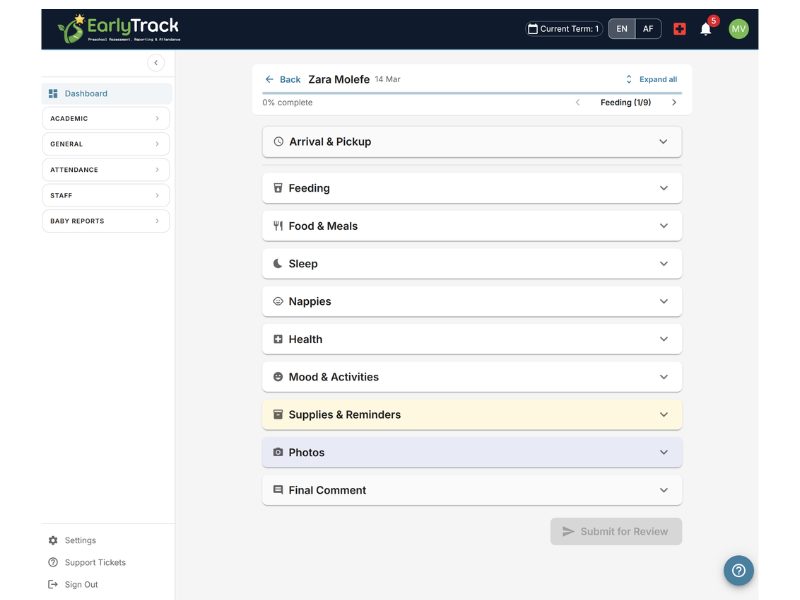
The EarlyTrack Baby Daily Report is structured around nine sections. Teachers work through them throughout the day - completing each section as the event happens rather than reconstructing the day from memory at 4pm.
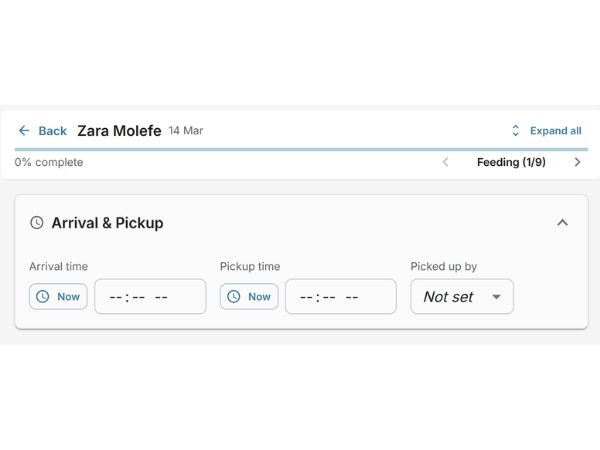
One-tap arrival and pickup logging
Arrival time and pickup time are recorded with a single “Now” button tap - no typing required. Pickup-by is selected from three options: Mommy, Daddy, or Other. The QuickTimePicker also supports manual time entry for cases where the teacher records arrival after the fact.
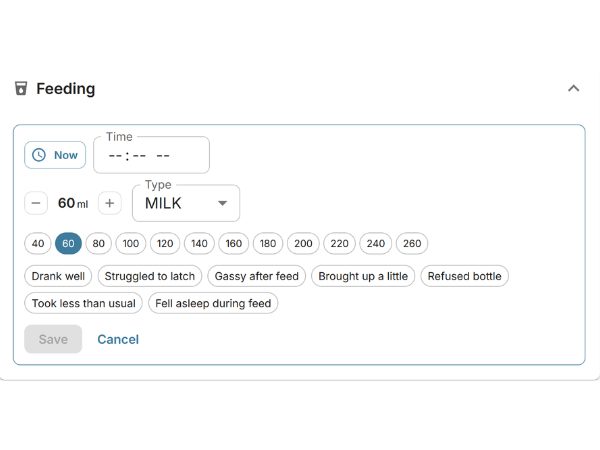
Every feed logged as it happens - time, amount, type, and notes
Each feeding event is logged individually. The teacher selects the time using the Now button or enters it manually, uses a stepper to record the amount consumed (0 to 500ml in 10ml increments), and selects the feed type from Milk, Water, Juice, Tea, or Other. Structured feeding notes are selected by tapping chips.
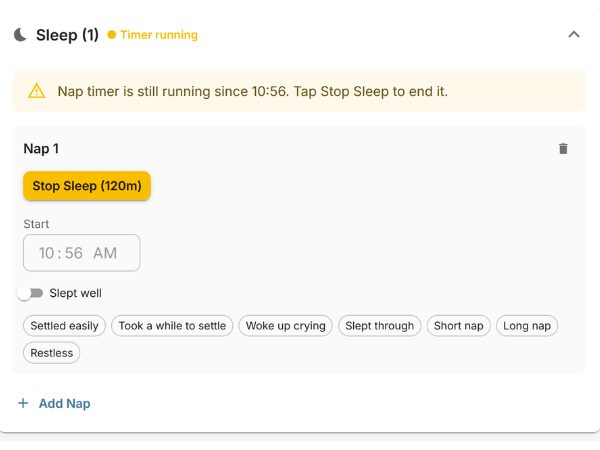
Live nap timer with automatic duration - up to five naps per day
The teacher taps “Start Sleep” when the baby goes down and “Stop Sleep” when the baby wakes - EarlyTrack calculates the duration automatically. Up to five separate nap slots are supported per day. A “Nap timer still running” banner reminds the teacher if a timer was started and not stopped. Manual start and end time entry is also available. Sleep quality and nap notes are selected from structured chips.
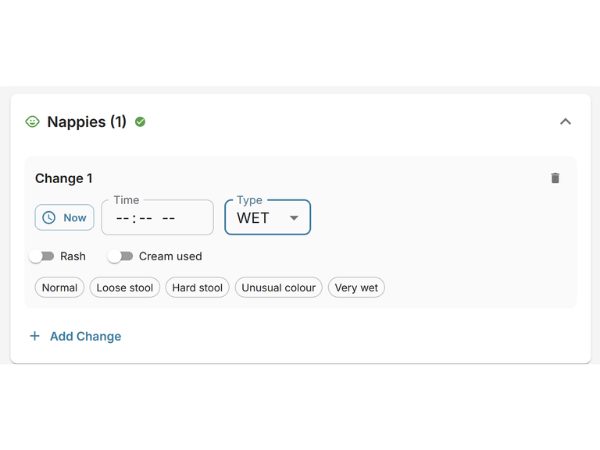
Up to 20 nappy changes per report - type, rash, cream, and notes
Each nappy change is logged with change type (Wet, Dirty, or Both), an optional time, a rash indicator toggle, a cream-applied toggle, and structured observation notes. Up to 20 nappy changes are supported per report, covering even the most active days in an infant classroom.
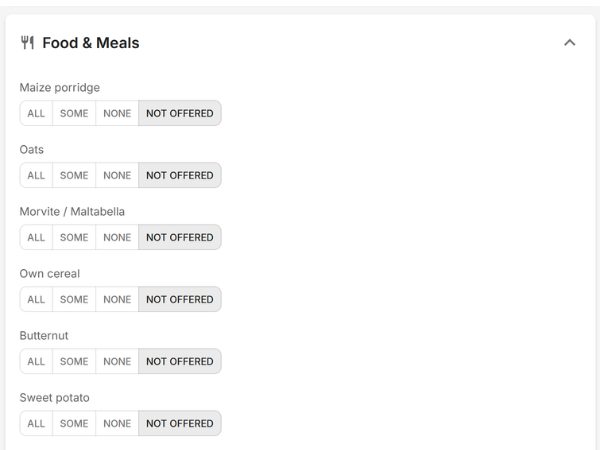
Menu grid with All / Some / None / Not Offered - 15 default SA food items
The food section presents the school’s menu as a grid. Each food item has four status buttons: All, Some, None, or Not Offered. The teacher taps a status for each item at mealtimes. Not Offered items are automatically hidden from the parent view - parents only see food that was actually offered. An overall eating summary is selected from chips.
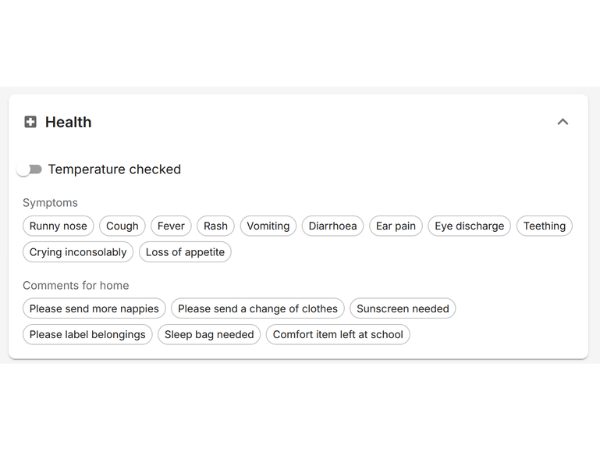
Temperature, 11 symptom chips, comments for home, and medication with authorisation gate
Teachers can record temperature readings in °C with time, select from 11 structured symptom chips including Runny nose, Fever, Rash, Vomiting, Teething, and Ear pain, and add comments for home. The health section is hidden in the parent view if left empty. Medication administration requires a valid, active MedicationAuthorisation record - the section only appears when one exists.
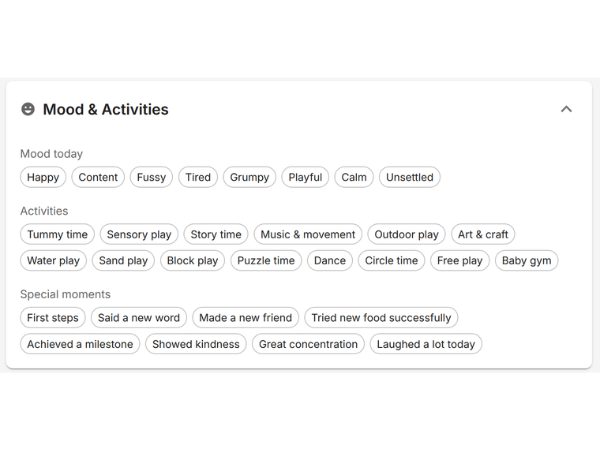
8 moods, 14 activities, 8 special moments - the highlights parents treasure
Teachers select mood chips from eight options - Happy, Content, Fussy, Tired, Grumpy, Playful, Calm, and Unsettled - and activity chips from 14 categories including Tummy time, Sensory play, Story time, Music and movement, Outdoor play, Art and craft, Water play, and Baby gym. Special moments like “First steps”, “Said a new word”, and “Showed kindness” appear in the parent portal as a permanent, dated record.
Supply requests and school reminders embedded directly in the report
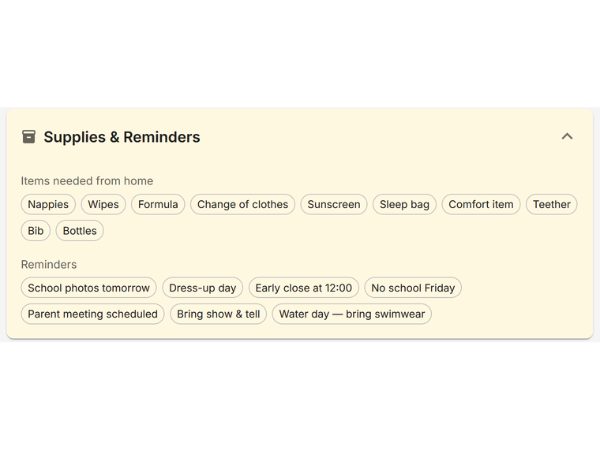
Teachers log supplies the parent needs to send - Nappies, Wipes, Formula, Change of clothes, Sunscreen, Sleep bag, Comfort item, and others. School reminders are embedded directly in the report: school photos tomorrow, water day, early close. Parents receive these as part of the daily report rather than in a separate message that might be missed.
Up to 10 photos per report - photo consent enforced at API level
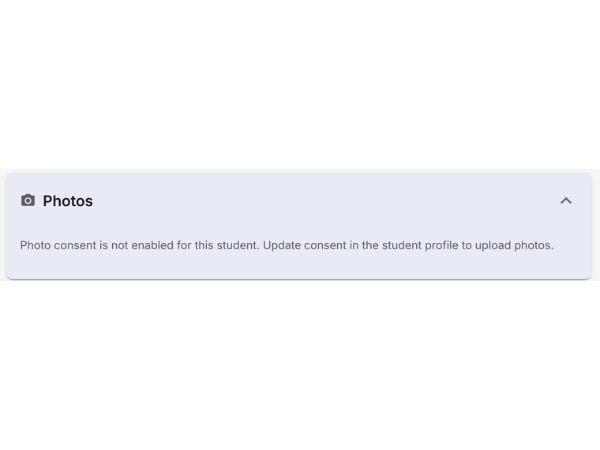
Teachers can upload up to ten photos per daily report. Photos are served through authenticated endpoints. Parents access them only through their authenticated parent portal. Photos cannot be uploaded or viewed for any child who does not have photo consent on record - this is enforced at the API level, not just in the interface.
The most prominent element in the parent portal - a personal note in a branded card
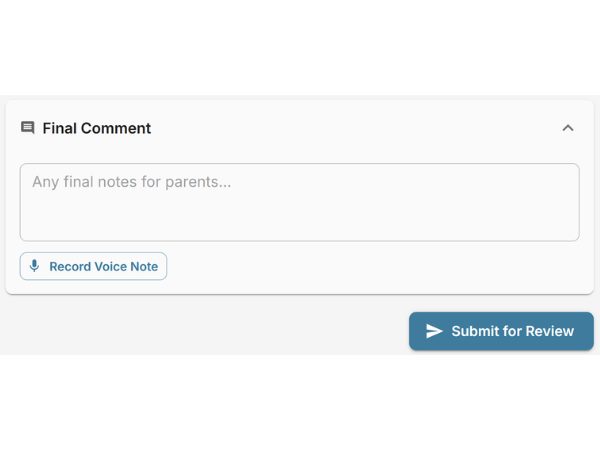
The final comment is a free-text note of up to 2,000 characters. It is displayed in the parent portal as a branded card under the heading “Message from your teacher” - positioned so it is the first thing a parent notices. Teachers with a Professional plan can dictate their message hands-free using voice-to-text. Both English and Afrikaans voice dictation are supported.
By default nothing reaches a parent until you have reviewed and approved it
Every daily report follows a controlled publication workflow. By default no report is visible in the parent portal until a principal or school administrator has reviewed it and clicked Approve. Little Learners, Neurodiverse and Class Reports can be set to publish on submit, and Baby can be set to Live so parents follow the day as it is logged.
Report is published instantly to the parent portal. Teacher is notified. All linked parents receive an email: “A daily report for [child’s name] is ready to view.”
Principal enters specific feedback. Teacher is notified immediately. They can edit and resubmit for a second review.
Once approved, a report is permanently locked. The approval record includes the approving administrator’s identity and the exact timestamp - a permanent audit trail. Teachers cannot approve their own reports - role-based access enforces this at the system level.
EarlyTrack automatically sends teachers an email reminder listing the names of children whose reports have not yet been submitted. Principals no longer need to manually chase teachers - the system handles it.
When a parent opens an approved report, the timestamp of that first visit is recorded. The teacher sees “Viewed by parent” - closing the loop between school and home. The first timestamp is preserved even when a second parent views it.
A complete record of their baby’s day, in their language, on their phone
When a daily report is approved, parents open their EarlyTrack parent portal and find every section of their child’s day laid out in a clean, structured view - arrival, feedings, sleep, nappy changes, food, health notes, activities, mood, photos, and the teacher’s personal message.
Portal tab and all section labels fully translated - bilingual English and Afrikaans. “Daaglikse Verslae” for Daily Reports, “Voedings” for Feedings, “Slaap” for Sleep, “Doeke” for Nappies.
For schools whose EarlyTrack locale is set to Afrikaans, the parent email notification on approval is delivered in Afrikaans - the full notification, not just the subject line. This is set at the school level, not per parent.
Medication cannot be logged without written parental consent on record
For schools that administer medication - pain relief for teething, antihistamines, prescribed medication - EarlyTrack’s medication logging system requires a formal MedicationAuthorisation record before any entry can be made.
The medication section only appears in the teacher’s daily report for a child when an active, valid, non-revoked MedicationAuthorisation record is on file for that child. No record - no medication section.
Medication name, dose, reason for administration, time given, and the teacher’s own initials. This record is permanent - it cannot be edited or deleted once the report is approved.
Authorisation records are soft-deleted when revoked, not permanently removed. The complete trail - who authorised what, for which child, and who revoked it - is preserved indefinitely. Admin-only creation and revocation.
Every option list is yours to configure
EarlyTrack ships with defaults appropriate for South African infant and toddler classrooms. School administrators can replace any list to match their actual menu, programme, and terminology.
Enable or disable parent email notifications on report approval
Show or hide medication logging for teachers
Enable or disable photo uploads per student
Working with three-year-olds and up? Use Little Learners.
The full Baby Daily Report is overkill for older classes. Little Learners Daily Reports is the lighter sibling - a short comment from the teacher and up to ten photos - with the same approve-before-publish workflow by default. Included on Professional Plus and Complete.
✏️ Teacher writes comment → 📷 Adds photos → 📤 Submits → ✅ Admin approves → Parent sees it
A specialised daily record for neurodiverse children
Some children need a richer daily record than either Baby or Little Learners cover - one that tracks emotion regulation through the day, therapy visits (OT, speech, physio, behavioural, play), nappy or toilet-training events for children still moving out of nappies, what they ate, and the context of each observation (class vs 1-on-1). Neurodiverse Daily Reports is the third format, designed specifically for this and included on Professional Plus and Complete.
👁️ Teacher logs sections → 📷 Optional photos → 📤 Submits → ✅ Admin approves → Parent sees it
One report for the whole class, written once
The other three formats are about one child. A class report is about the class: the theme, what they did together, what they sang, what they are practising, what was served, and a photograph. A teacher used to type that shared day into every child’s report; now it is written once and sent to every family in that class together. It carries no individual child’s information at all, and it is included on Professional Plus and Complete.
✍️ Teacher writes it once → 📤 Submits → ✅ Admin approves → Every family gets it together
One plan, four daily report formats
The Daily Reports set of formats is included on Professional Plus at R598 per month and on Complete at R799 per month, with nothing extra to buy. It includes Baby Daily Reports for infant and toddler classes, Little Learners Daily Reports for older preschool and Grade R, and Neurodiverse Daily Reports for schools supporting neurodiverse children, and Class Reports for the shared day a whole class had. One subscription, every child covered.
Included on Professional Plus at R598 per month and Complete at R799 per month. All four formats - Baby, Little Learners, Neurodiverse and Class - are included in one subscription. Not included on the Standard plan.
Trusted by nursery school principals across South Africa
“Before EarlyTrack, our baby class teachers were still writing by hand at the end of every day. Parents were phoning us about feeding times we couldn’t remember. Now the report is built throughout the day and parents see it before they even get home.”
- [Principal Name], [School Name], [City]
“The medication authorisation system alone was worth it for us. We have several babies on prescribed medication and the paper trail we used to keep was not good enough. Now it’s documented, audited, and locked.”
- [Principal Name], [School Name], [City]
“My parents with Afrikaans babies love that the portal is in Afrikaans. They feel like the school is speaking to them, not just sending them an English report.”
- [Principal Name], [School Name], [City]
Everything you need to know about Baby Daily Reports
About the module
The module is designed for baby and toddler classes - specifically children in the 0 to 1 and 1 to 2 year age groups. It does not appear for older preschool or Grade R classes, which use the ELDA and Grade R assessment modules instead.
Yes. The digital daily report covers every section that a paper card covers - feeding, sleep, nappies, food, health, mood, activities, and a personal message - and adds sections a paper card cannot support, including a live nap timer, photo uploads, a medication administration log, and a parent analytics dashboard showing trends over 7 or 30 days.
All four Daily Report formats are included on EarlyTrack Professional Plus at R598 per month and on EarlyTrack Complete at R799 per month. There is no separate add-on to buy. They are not included on Standard, Professional or the Aftercare Edition.
By default, no. Reports are only published to the parent portal after a principal or school administrator has reviewed every section and clicked Approve, and nothing is visible to parents while a report is in draft, in progress, or awaiting review. Little Learners, Neurodiverse and Class Reports can be set to publish the moment a teacher submits. Baby Daily Reports keeps its review step, but can be set to Live so parents follow the day as staff log it.
No. The medication section only appears in a teacher’s daily report when an active, valid MedicationAuthorisation record exists for that child. The administrator creates and manages authorisation records. Without one, the medication section is hidden entirely.
Photos are only shared with parents in the portal if the child has photo consent on record. If a child does not have consent, the upload button is hidden from the teacher and the API blocks any upload attempt for that child. Photo consent is managed per child in the student profile.
Portal, notifications, and compliance
Yes. All section labels in the parent portal are translated into Afrikaans - Daaglikse Verslae, Voedings, Slaap, Doeke, Gesondheid, Aktiwiteite, and others. The report content itself is in the same language the teacher used when creating the report. If the teacher works in Afrikaans, parents see a fully Afrikaans report.
Yes. The school administrator can replace the default food item list with any custom items. The same customisation is available for moods, activities, special moments, supplies, reminders, symptoms, feeding notes, nappy notes, and eating summaries - every chip-based option list in the module is configurable by the admin.
The principal can select “Request changes” from the review screen and enter a specific comment explaining what needs to be fixed. The teacher receives an immediate notification, edits the report, and resubmits. The principal reviews again before approval. The feedback comment is cleared on resubmission.
No. Daily reports are viewed in the parent portal only - there is no PDF generation for this module. The portal view is accessible on any device at any time, and the full history of approved reports remains searchable and available indefinitely.
Reminders, confirmation, and voice
Yes. EarlyTrack automatically sends teachers an email listing the names of the children whose daily reports are still incomplete. Principals no longer need to manually chase teachers at the end of the day - the reminder is handled by the system.
Yes. When a parent opens an approved report in the parent portal, EarlyTrack records the timestamp of that first visit. The teacher can see a “Viewed by parent” confirmation when they open the same report in their editor. If a second parent linked to the same child opens the report, the original read timestamp is preserved.
Yes, for schools whose EarlyTrack interface is set to Afrikaans. When a report is approved and the school’s locale is Afrikaans, the email notification sent to parents is delivered in Afrikaans - the full notification, not just the subject line. This is set at the school level, not per parent.
Yes. The voice-to-text feature uses the same speech recognition service used across EarlyTrack’s assessment tools. The language is set automatically based on the teacher’s current interface language. Both English and Afrikaans voice dictation are supported. Voice-to-text is included wherever Daily Reports are, on Professional Plus and on Complete, at no extra cost.
Up to ten photos per daily report - same limit for Baby Daily Reports (0 to 3) and Little Learners Daily Reports (older classes). JPG, PNG, WebP, and HEIC are all accepted.
Little Learners Daily Reports (older classes)
Yes. Professional Plus and Complete include a second format called Little Learners Daily Reports, a lightweight daily comment plus up to ten photos, available for every age group, not just babies. It uses the same approve-before-publish workflow by default, which a school can switch to Instant, and is shown in the parent portal in its own section. Schools running infant classes for the structured Baby cards and older classes for Little Learners get both, with no second subscription.
No. Little Learners is included at no extra cost. Professional Plus at R598 per month and Complete at R799 per month cover all four formats.
Neurodiverse Daily Reports (specialised tracking)
Yes. Professional Plus and Complete include a third format called Neurodiverse Daily Reports, designed specifically for schools supporting neurodiverse children. It covers nappies and toilet-training (timestamped log with type and method), food (the same 4-meal structure as Baby), an emotion-regulation log with a customisable chip palette (Calm, Anxious, Overwhelmed, Regulated, Dysregulated, and any others you add), therapy visits (Occupational, Speech, Physio, Behavioural, Play - with therapist name, start and end times, and session notes), an observation flag (class observation vs 1-on-1), up to ten photos, and a teacher comment. Same approve-before-publish workflow as Baby and Little Learners. Like Little Learners it can be set to publish on submit; Baby always keeps its review step. Off by default - an administrator switches it on per school under Settings.
No. Neurodiverse Daily Reports is included at no extra cost. Professional Plus at R598 per month and Complete at R799 per month cover all four formats: Baby, Little Learners, Neurodiverse, and Class Reports.
The other three formats are about one child. A Class Report is about the class: the theme, what they did together, what they sang, what they are practising, what was served, and a photograph. A teacher used to type that shared day into every child’s report; a class report carries it once and sends it to every family in that class together. It contains no individual child’s information at all.
No. Class Reports is included at no extra cost. Professional Plus at R598 per month and Complete at R799 per month cover all four formats: Baby, Little Learners, Neurodiverse, and Class Reports.
Yes, once every family in that class has agreed to shared class photographs. Because the photograph shows other families’ children, this is a separate permission from the ordinary photo consent, and parents give it themselves in their portal. Until everyone has agreed the words still go out; only the photograph waits, and the review screen names the families still to agree.
Every box has its own switch under Settings → Class Reports: theme, activities, songs and stories, learning focus, the Early Learning and Development Areas, the general comment, reminders, class photographs and meals. Switching one off removes it from the teacher’s form and from what families receive. Nothing already written is deleted, so switching it back on brings the words back.
Yes. Under Settings → Modules → Neurodiverse Daily Reports, the school administrator can add custom emotion labels, custom therapy types, and custom food items to the chip palettes. The built-in defaults stay in place; your custom additions sit alongside them. This makes the module fit each school's terminology without compromising the structured data underneath.
Your baby class teachers are filling in paper cards tonight. They don’t have to be.
The EarlyTrack Baby Daily Report module gives your infant and toddler teachers a mobile-first digital report they can complete throughout the day - with feeds, sleep, nappies, food, and a personal message to parents built in real time, not reconstructed from memory at four in the afternoon. Parents receive the approved report before their baby is even home. The principal reviews every report before it reaches a single parent. The medication authorisation system is built in. The analytics dashboard gives parents context their paper card never could. And every record is permanent.
Start your free 14-day trialNo credit card. Full Professional access during the trial. After it, all four Daily Report formats are included on Professional Plus at R598/month and on Complete at R799/month. Cancel any time.
EarlyTrack also covers parent communication, bilingual English and Afrikaans support, AI observation comments, staff management, and ELDA and Grade R assessments.