
An AI finance helper that only ever suggests.
It proposes payment matches, expense categories, anomalies to check, reminder drafts and month-end summaries, and a person approves every single action. It never moves money or sends a message on its own.
- Every suggestion shows a confidence level and a plain reason
- Nothing happens on its own, you Approve, Reject or Edit
- POPIA consent gate, with no personal information in its audit
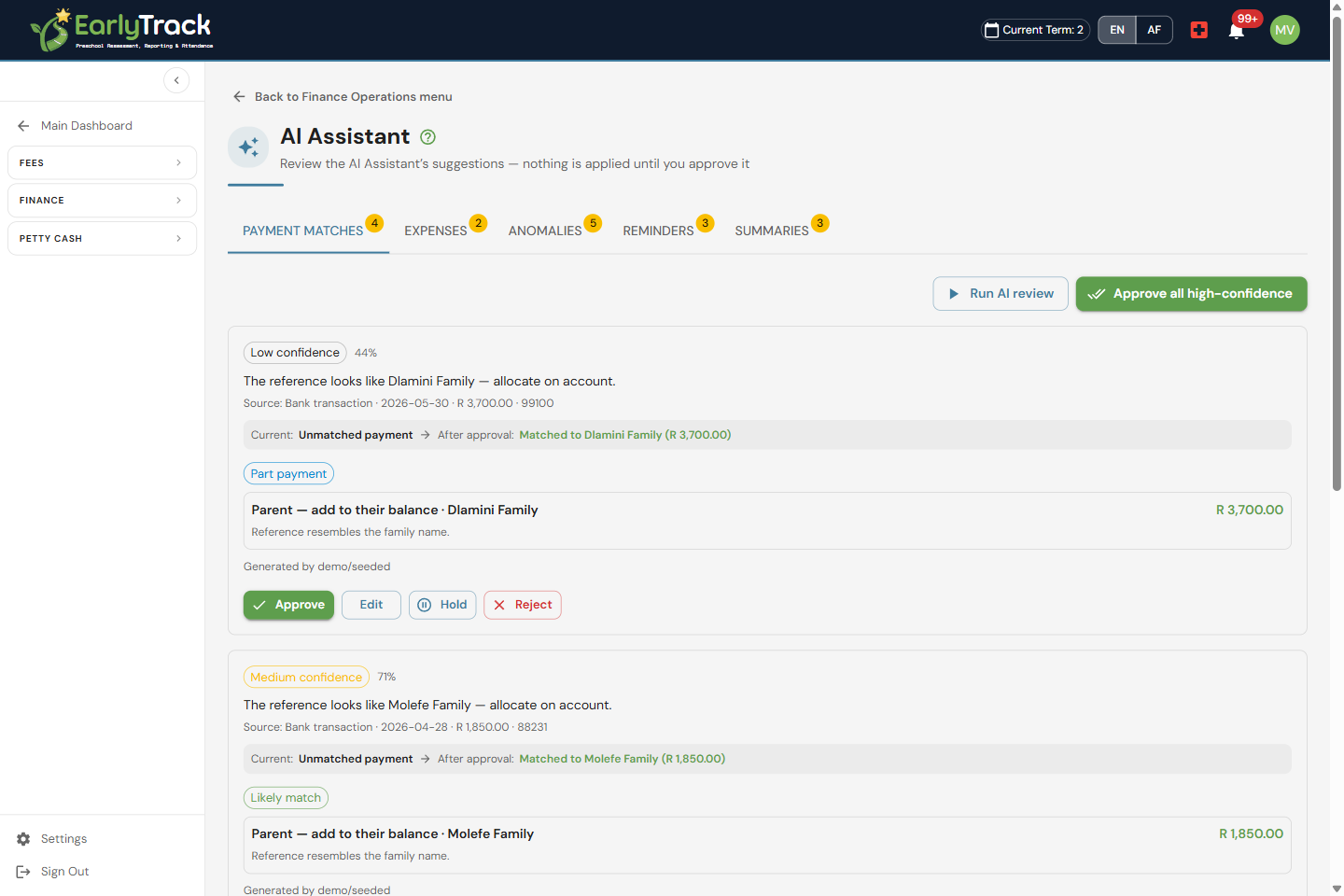
Suggestions you approve, never auto-actions
Every suggestion the AI makes shows a confidence level and a plain reason for why it was made, then lands in an AI review inbox. You stay in charge: Approve it, Reject it, or Edit it first. Nothing moves money, sends a message or changes a record on its own, the AI proposes, a person decides.
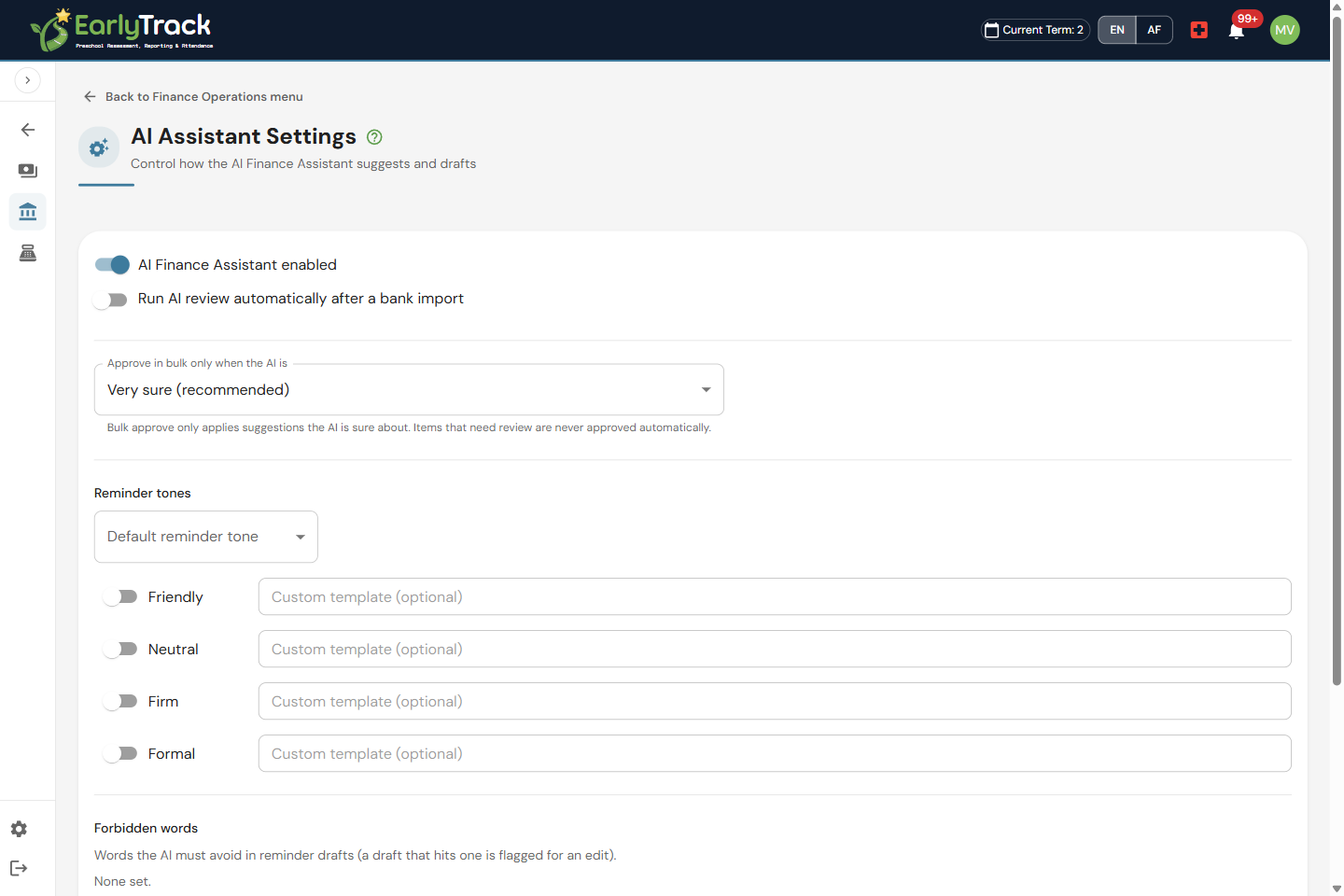
On, off, and POPIA-safe, your call
You decide how much the AI does. Turn it on or off, set whether it may auto-run, and choose the tone of the reminder drafts it writes. A POPIA consent gate means the assistant stays off until consent is recorded, and no personal information is written to its audit, so you always have a clean record of what it suggested and who approved it.
The work it offers to do, so your books stay tidy
The AI Finance Assistant watches the everyday finance work that eats a principal's week and turns it into a short list of suggestions to check. It proposes which payment likely matches which invoice, suggests a category for each expense, and flags transactions worth a second look, such as a possible overpayment or an amount that sits outside the usual pattern. Each one arrives with a confidence level and a plain reason, so you can see the thinking before you Approve, Reject or Edit it. The assistant never posts a match, files an expense or clears a flag on its own: it does the spotting, you make the call.
Reminder drafts and summaries, ready for your sign-off
When a fee is overdue, the assistant can draft a polite reminder in the tone you choose, but it never sends it: the draft waits for you to read, tweak and approve, then you decide whether it goes out. At the close of the month it can pull together an account summary and a month-end summary, so you walk into a meeting with the numbers already gathered. As with everything else, these are suggestions in your AI review inbox, and a person approves each one before it is used.
What's included
The AI Finance Assistant is part of EarlyTrack Complete.
An AI that helps, with guardrails on every suggestion
The AI Finance Assistant is designed so it can never act behind your back, and you can always show exactly what it suggested and who approved it.
It only ever suggests
The assistant proposes payment matches, expense categories, anomalies, reminder drafts and summaries, it never moves money, sends a message or changes a record on its own.
A person approves every action
Every suggestion waits in an AI review inbox, with a confidence level and a plain reason, until someone Approves, Rejects or Edits it. Nothing happens on its own.
POPIA consent gate, no personal info in its audit
The assistant stays off until consent is recorded, and no personal information is written to its audit, so you keep a clean, defensible record of what it suggested and who approved it.
On or off, entirely your call
Turn the AI on or off whenever you like, and set whether it may auto-run. When it's off, its screens go inactive and it stops making suggestions until you turn it back on.
AI Finance Assistant questions, answered
An AI helper that keeps you in control
The 14-day free trial gives you full access, including the AI Finance Assistant, suggestions you approve, behind a POPIA consent gate, with no credit card required.
Start your free trialNo credit card. Full access. Cancel any time.